Vibe coding in 2026: what changed, how to choose, and how to build with a spec
What "vibe coding" means
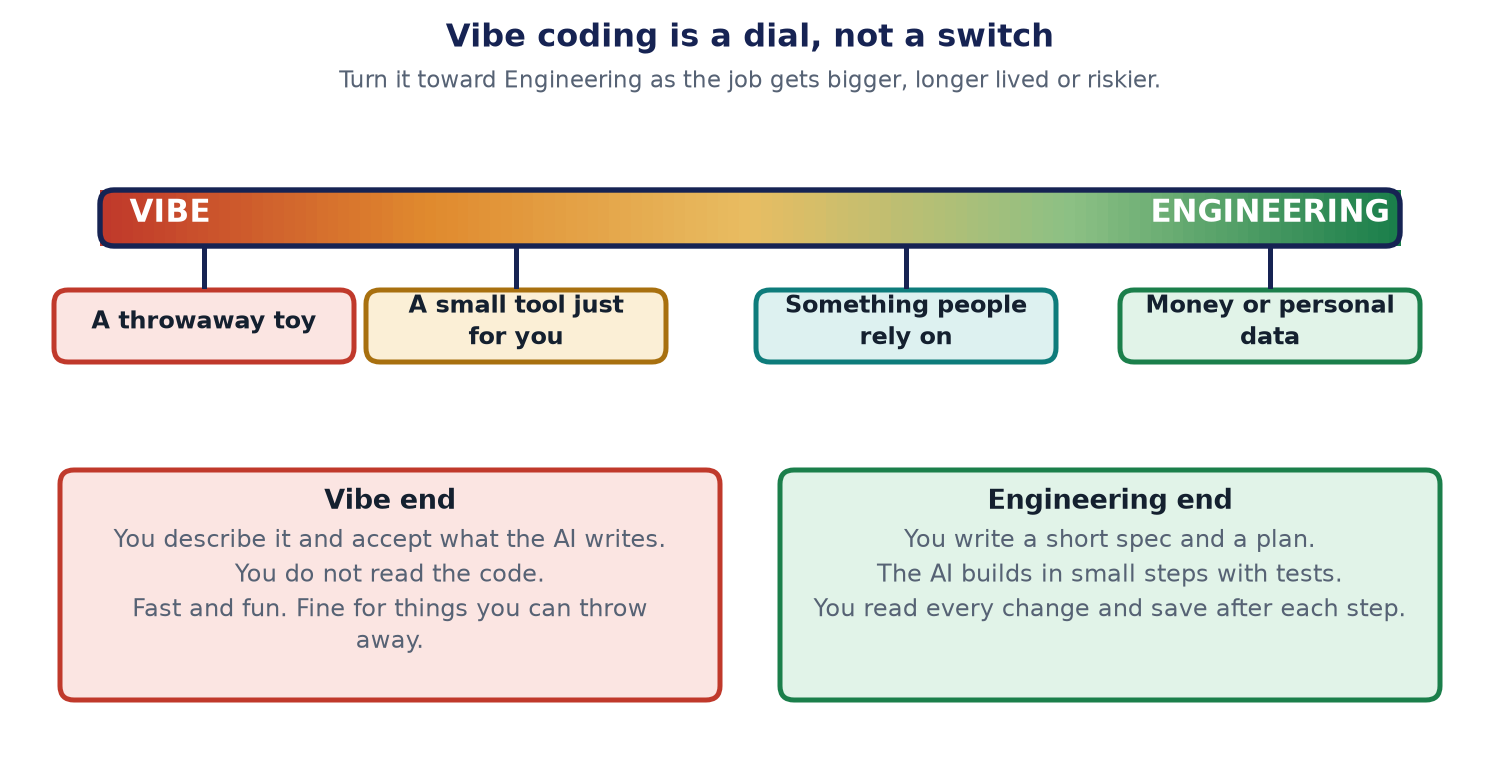
In early 2025, the AI researcher Andrej Karpathy, as reported, used the phrase vibe coding for a relaxed way of building: you tell the AI what you want, you accept what it writes, and you do not read much of the code. If something breaks, you paste the error back and try again.
That is a fine way to make a toy, a game or a one-day tool. It is a risky way to make something that holds other people's money or private data. Since then, people have built a whole range of ways to work with AI on code. Some are casual and some are strict. Reports say the careful end is now often called agentic engineering: the AI does the typing, and a person stays in charge of the plan and the checking.
Think of cooking. Heating soup from a tin is quick and nobody minds. Cooking for a wedding needs a menu, a shopping list, steps, and tasting along the way. Both are "cooking". You choose the care that fits the day.
Why the careful end matters
- A study by METR, a research group, as reported in 2025, followed experienced developers working on their own projects. They expected AI tools to speed them up. In that study they finished slower. One study is not the whole story, but it shows that feeling fast is not the same as being fast. See METR's write-up.
- Veracode, a security company, reported in 2025 that a large share of the code samples it tested from AI tools had security flaws. Check their report for the exact numbers and method.
- AI code can look right and still be wrong. It will not tell you what it quietly skipped.
These are reasons to check, not reasons to stop. The checking is the part that does not go away.
Five ways to build with AI
Here are five ways in use today. They are not a ladder. Each one fits some jobs.
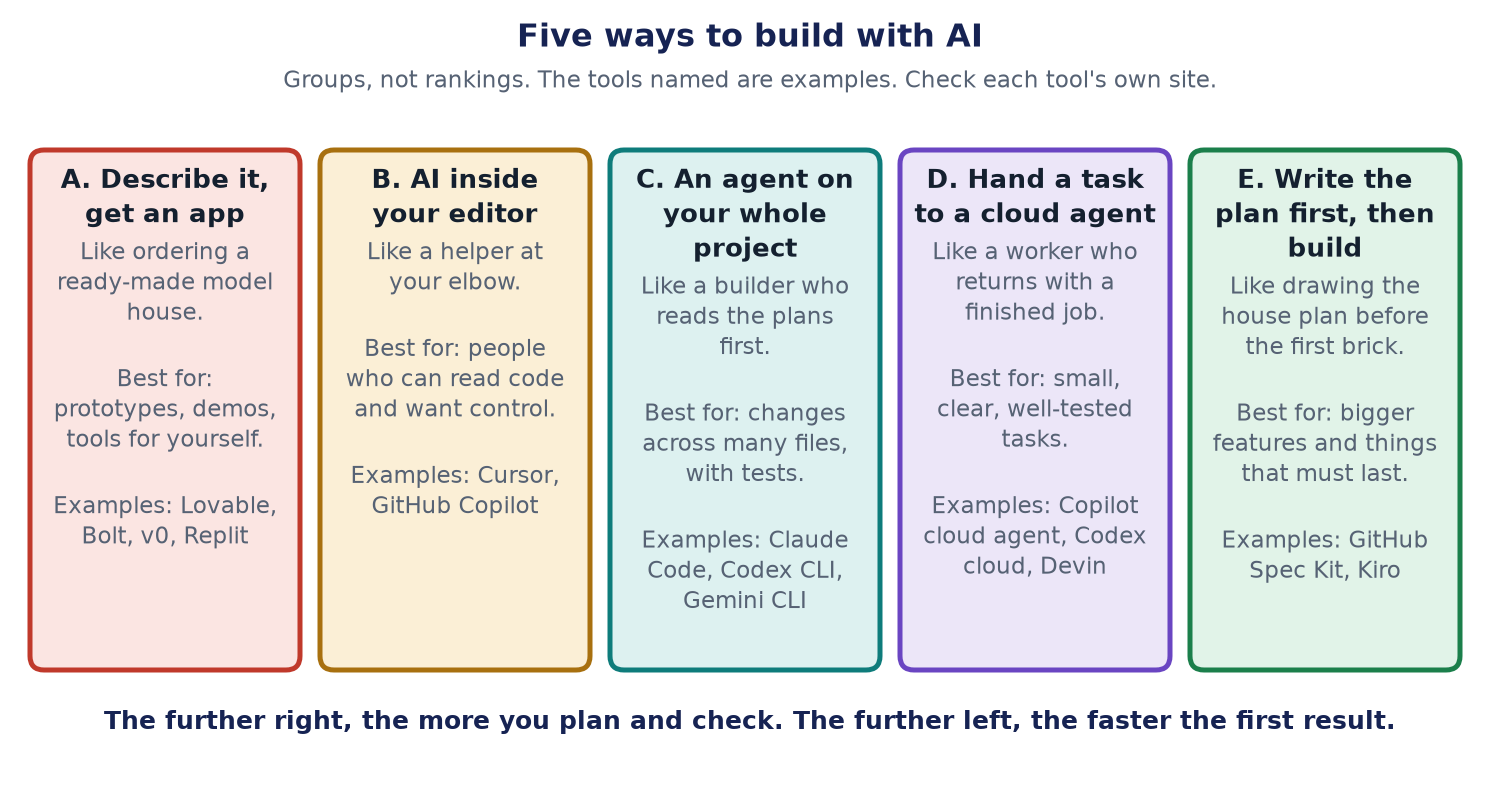
- A. Prompt-to-app builders. You type what you want and a website makes the whole app. Fastest start. Best for ideas, demos and first drafts.
- B. AI in your editor. The AI suggests the next lines as you type, and you stay in control. Good when you can read code.
- C. A project agent. A tool such as Claude Code or the Copilot agent reads your project folder, edits files and runs commands on your computer. Good for real projects when you review each change.
- D. A cloud agent. You give it a task. It works on its own in the cloud and sends back a finished change for you to review. Good for small, clear jobs with tests.
- E. Spec-driven. You write down what you want and why, then a plan, then small tasks. The AI builds from those files. Good for bigger or unclear changes, and for anything that must last.
Words explained
- Prompt: the message you type to the AI.
- Agent: an AI that can take steps on its own, such as editing files or running tests.
- Spec (short for specification): a written description of what you want and why.
- Test: a small check that says pass or fail.
- Commit: saving a snapshot of your work so you can go back to it.
Which way should I build?
Answer these questions from the top. Stop at the first answer that fits.
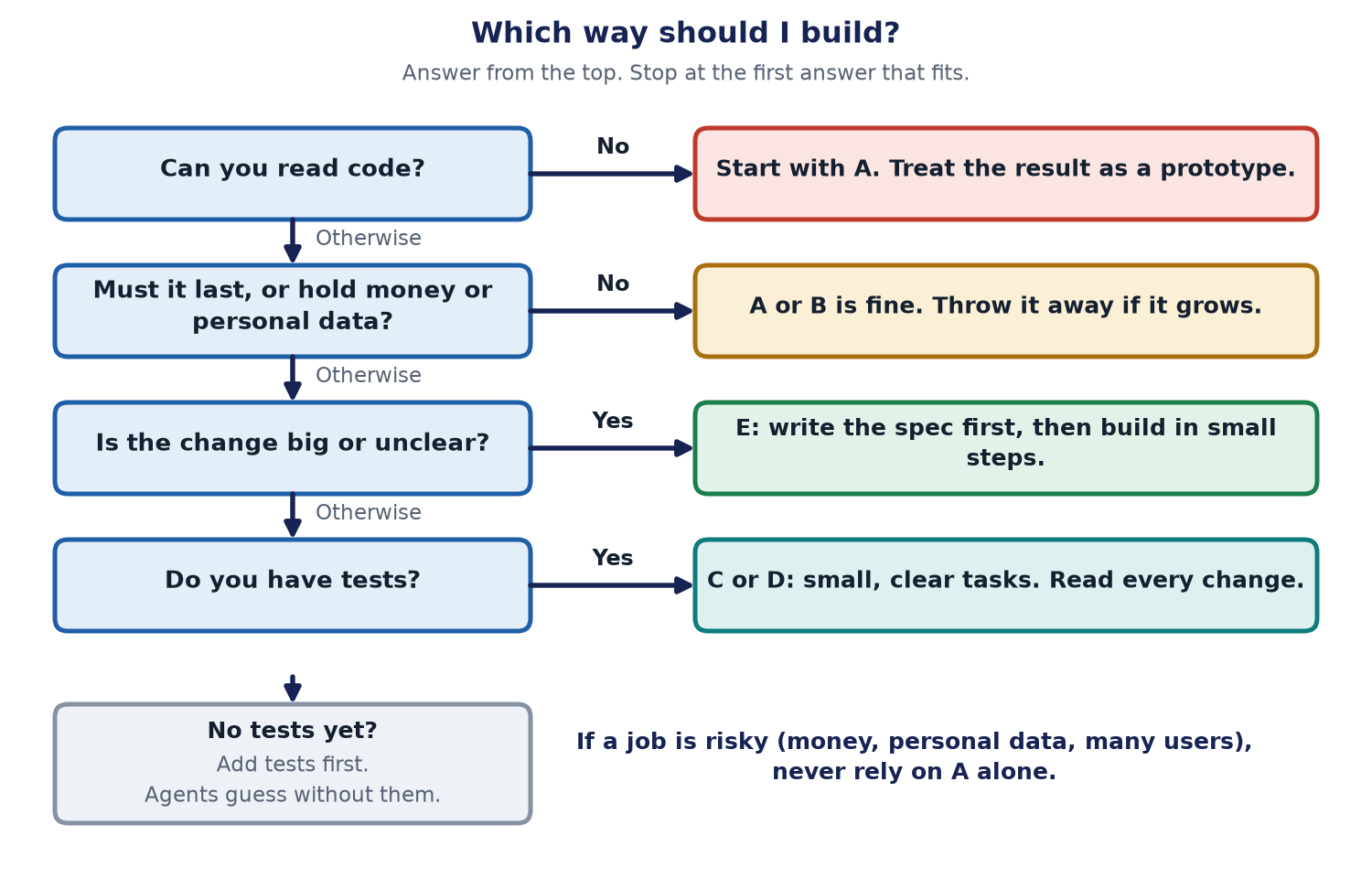
You can also try the interactive helper: Which way should I build?. It asks the same questions and gives one suggestion.
| Your situation | A good fit | Add this |
|---|---|---|
| A toy, a demo, a one-day idea | A | Do not put real data in it |
| You can read code and want speed | B | Read every suggestion before you keep it |
| A real project with a few files | C | Keep a rules file. Review each change |
| A small, clear task with tests | D | Read the finished change before you merge |
| Big, unclear, or must last | E | Two review points: after the plan and after the tasks |
| Money, personal data, many users | E, plus C or D | Tests first. A person reads the code |
The new idea: spec-driven building
The newest habit in 2026 is to write the spec first. Why? Because an AI works from what you tell it. A vague wish gives a vague result. A clear page of "what and why" gives the AI something to build against, and gives you something to check against.
Think of building a house. You do not hand over a bag of bricks and say "make a nice home". You give a drawing, then a plan of the work, then a list of jobs. The builder follows them, and the inspector checks each stage.
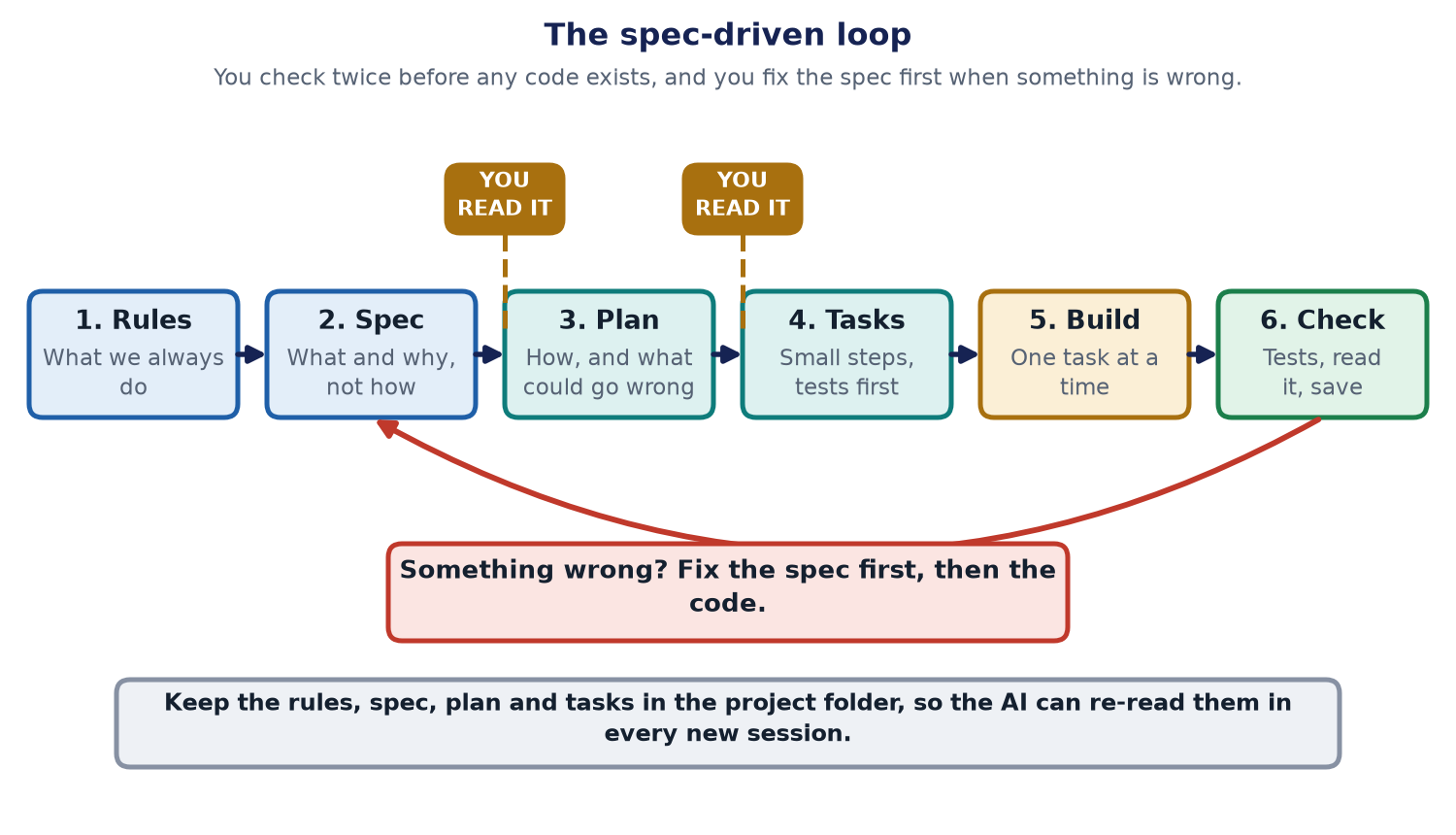
- 1. Rules. What always holds in this project, such as the language, the style, and what the AI must never do.
- 2. Spec. What you want and why. Not how.
- 3. Plan. How to build it, and what could go wrong. You read it.
- 4. Tasks. Small steps, each with a test to write first. You read the list.
- 5. Build. The AI does one task at a time.
- 6. Check. Run the tests, read the changes, save your work.
If a result is wrong, do not just argue with the AI. Ask: was the spec unclear? Fix the spec first, then rebuild. Next time the AI starts fresh, the fixed spec is still there.
An example: Asha's bakery pre-order page
Asha runs a small bakery. She wants a page where neighbours can pre-order cakes for the weekend. This is an invented example. Here is how the spec-driven way would go.
A typical folder, as used by tools such as GitHub's Spec Kit, looks like this. Names can differ between versions, so check the tool you use.
asha-bakery/
  CLAUDE.md                     rules for Claude Code (or AGENTS.md)
  .github/
    copilot-instructions.md     rules for Copilot
  .specify/
    memory/
      constitution.md           the rules that always hold
  specs/
    001-preorder-page/
      spec.md                   what and why
      plan.md                   how, and what could go wrong
      tasks.md                  small steps
  src/                          the code the AI writes
  tests/                        the checks
Here is a tiny sample of each file. These are made-up examples to show the idea, not output from a real run.
Rules (constitution.md or CLAUDE.md): what never changes.
- Never store card numbers. Payment is handled by the payment provider.
- Every feature needs a test before the code.
- Keep pages simple and readable on a phone.
Spec (spec.md): what and why, with no technology talk.
Goal: neighbours can pre-order a cake by Friday noon.
Who: customers who live nearby, and Asha.
Must: pick a cake, a pickup day, and give a name and phone number.
Must not: take payment online in version 1.
Done when: Asha sees every order in one list.
Plan (plan.md): how, and the risks.
Use a simple form that saves orders to a list.
Risk: two people book the last cake. Stop orders when a cake runs out.
Risk: phone numbers are private. Show them only to Asha.
Tasks (tasks.md): small steps, tests first.
1. Test: an order with no name is refused. Then build the form.
2. Test: after 5 orders of one cake, the 6th is refused. Then build the limit.
3. Test: only Asha can see the list. Then build the list page.
Your first prompt, with Claude Code or Copilot
These are suggested wordings, not magic words. Change them to fit your project.
- Start in plan mode, or ask for a plan first. Claude Code has a Plan Mode where it reads and proposes but does not change files. Copilot's agent can also be asked to plan first.
- Suggested first prompt: "Read the rules file. I want a weekend cake pre-order page. Do not write code yet. Write a short spec of what and why, and list the questions you need answered."
- Then: "Now write a plan. List what could go wrong. Then list small tasks, each starting with a test." Read both. Fix them. Only then say: "Do task 1 and stop."
- Keep the rules in a file. Claude Code reads CLAUDE.md. Copilot reads .github/copilot-instructions.md, and many tools also read AGENTS.md. A rules file is context for the AI, not a lock. It can still be ignored, so the tests are your real safety net.
- Come back tomorrow. Because the spec, plan and tasks are files, a new session can read them and carry on. Claude Code can also resume a recent session.
- Mind the limits. A cloud agent may stop after a time limit. Keep tasks small so each one finishes.
Read the official guides: Claude Code, GitHub Copilot and GitHub Spec Kit. Tools change fast. As of October 2026 this is how we understand them, and the guides win if they differ.
Safe habits for every way
- Never paste passwords, keys or real customer data into an AI tool.
- Work in small steps and save (commit) after each one, so you can go back.
- Write the test before the code. A test is how you know the AI did what you asked.
- Read every change that touches money, logins or private data.
- Give the AI the least power it needs. Read Autonomy is earned for why.
- Test the result with real questions, as in Zero failures is not proof. Watch the cost too: see cost-aware testing.
- If your app uses AI itself, see Why RAG is still needed for what to put in front of the model.
New to how the AI works inside? Start with the free book, AI Foundations, and the chapter on agents and tools.
For engineers
- Spec-driven tools. GitHub Spec Kit gives slash commands for a constitution, spec, plan, tasks and implement steps, and writes them as Markdown in the repo. Amazon's Kiro uses a similar requirements, design and tasks flow. We have not run these tools end to end for this article, and folder names vary by version.
- Context files. CLAUDE.md, copilot-instructions.md and AGENTS.md are loaded as context. They guide but do not enforce. Enforce with tests, CI checks, branch protection and, in Claude Code, hooks that run a command before or after a tool call.
- Review points. Put two human gates before code: after the spec and plan, and after the task list. Then use small diffs, test-first tasks and CI as the third gate.
- Parallel work. Claude Code supports subagents and git worktrees, so separate tasks can run in separate checkouts. Merge them one at a time.
- Risk. Treat generated code like code from a stranger: review, scan dependencies, run tests, and check secrets before every merge.
- Cost. Long sessions re-read long context. Keep specs short and tasks small. See cost-aware testing.
The limits of this advice
- Tools and names change every few months. Check the official guides before you copy a folder layout or a command.
- The METR and Veracode results are single studies with their own methods. They are reasons for care, not proof about every team.
- Spec-driven work is slower to start. For a toy or a one-day idea, it is too much. Use the dial.
- A spec can be wrong too. The review points exist because the AI will build the wrong thing very neatly if you let it.
- The Asha example and the file samples are invented to teach the idea. They are not from a real client or project.
A note on how this site is made: parts of it were built with AI coding tools, with a person reviewing and testing the result.