Books › AI Foundations: from zero
The machine learning workflow, step by step
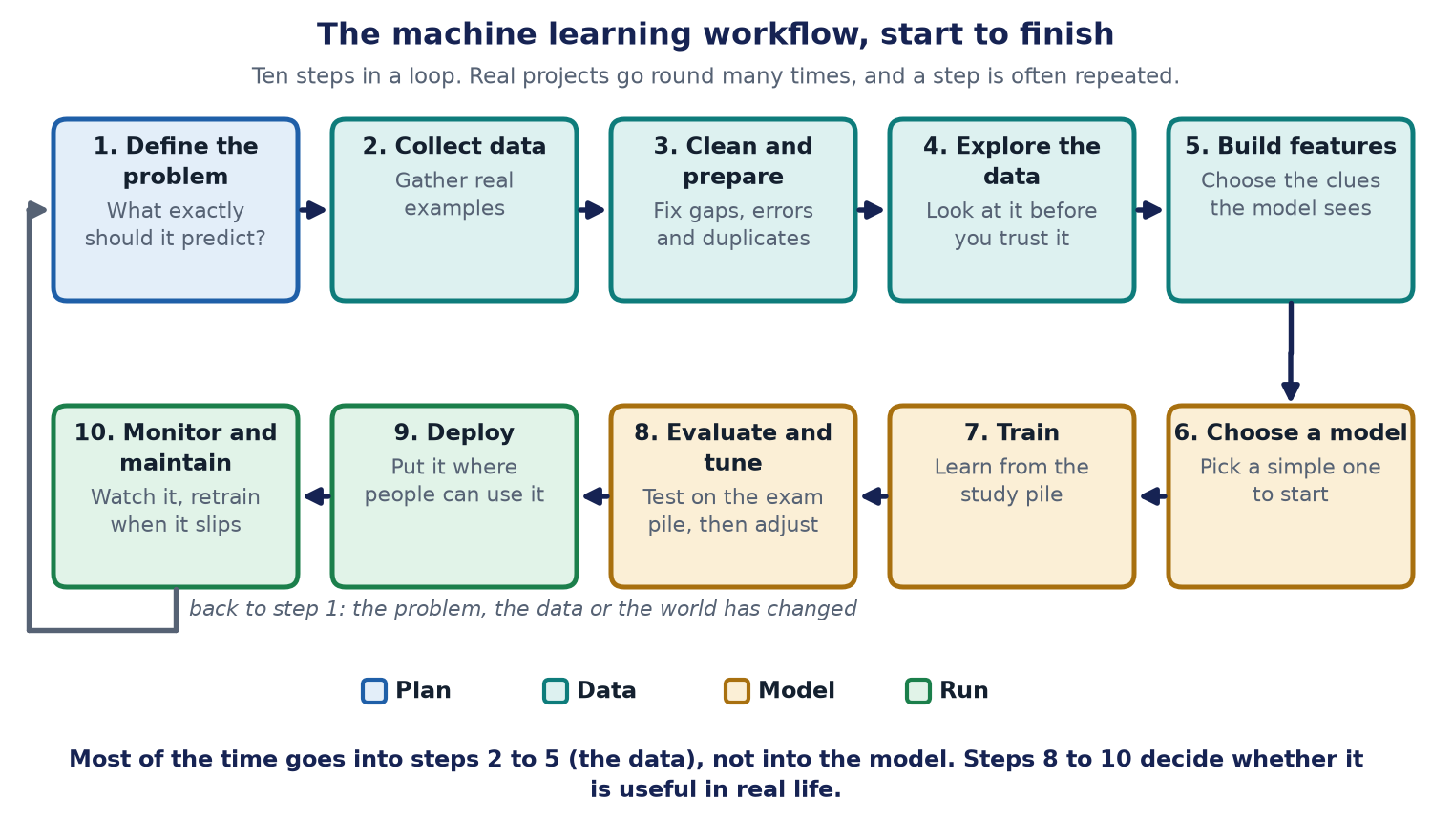
Why a workflow matters
Many people think machine learning means "pick a model and train it". That is one step out of ten. Teams that skip the others get models that look good on a laptop and fail in real life.
Asha wants a helper that sorts customer messages into order, question or complaint. We will follow her through all ten steps. For each step you will see what to do, the usual trap, and what to check.
Step 1: Define the problem
What you do. Turn a wish into a measurable job. "Help with messages" is a wish. "Label each message as order, question or complaint, and catch at least 95 in 100 complaints" is a job.
Also ask: do we need machine learning at all? If a few simple rules solve it, use the rules. Learning is for problems where the rules are too tangled to write.
The trap. A vague goal. Without a number to aim for, nobody can say when you are done.
Check. Can you write the success measure on one line, in words a customer would understand?
Step 2: Collect data
What you do. Gather real examples, each with its right answer (the label). Asha uses one year of her own messages. A helper marks each one.
The traps.
- A lopsided sample. If you only collected messages from quiet Mondays, the model has never seen a Saturday rush.
- Labels that disagree. If two people mark the same message differently, the model is learning from confusion. Let two people mark a small sample and see how often they agree.
- Too few examples of the rare thing. Complaints are rare, so you need enough of them to learn from.
- Privacy. Remove names and phone numbers unless you truly need them.
Check. Does the data look like the real world the model will face?
Step 3: Clean and prepare
What you do. Fix what is broken: duplicates, empty fields, mixed date formats, odd symbols, obvious typing mistakes. Put everything in one tidy table.
The big rule: split first. Before you do anything that learns from the data, lock away the final exam pile (Chapter 3). For example, if you fill in missing values using an average, work out that average from the study pile only. If the exam pile influences your choices, you have leaked the answers.
A common split for Asha's 1,000 marked messages is 700 to study, 150 to practise on, 150 for the final exam.
The trap. Throwing away strange rows that are rare but important, such as the angriest complaints.
Check. Can you rebuild the clean table from the raw data with one command? If not, the work cannot be repeated.
Step 4: Explore the data
What you do. Look before you leap. This step is called exploratory data analysis, or EDA. Count how many messages fall in each group. Read a sample. Draw simple charts. Ask the people who do the work what looks odd.
Asha discovers that only 3 in 100 messages are complaints. That one fact changes everything: a model that says "not a complaint" every time would be 97% accurate, and completely useless. So she will measure recall for complaints, as Chapter 3 explained.
The trap. Skipping this step because it feels slow. It is the cheapest way to avoid a nasty surprise.
Check. Can you describe the data in five sentences to someone who has never seen it?
Step 5: Build the features
What you do. A feature is one clue given to the model. For messages, the clues might be the words, the length, the time of day, and whether the message has an exclamation mark. Choosing and shaping clues is called feature engineering. Dropping clues that do not help is called feature selection.
For text, modern systems often turn the words into embeddings (Chapter 5), so the model gets the meaning rather than raw words.
The trap: a clue that gives away the answer. Suppose the table has a column called "refund sent". Complaints often end with a refund, so the model learns "refund sent means complaint" and scores brilliantly. But at the moment a new message arrives, no refund has been sent yet. The clue will not exist in real life. This mistake is called target leakage, and it is one of the most common reasons a model works in the lab and fails in the shop.
Check. For every clue, ask: will I really have this at the moment I need the answer?
Step 6: Choose a model
What you do. Start with a baseline: the simplest thing that could work. For Asha, the baseline might be "always guess the most common group", and then a simple model that looks at word counts. A baseline tells you what "good" means. If a clever model barely beats it, the cleverness is not paying off.
Then try something stronger only if the baseline is not good enough. Think about cost, speed and how easy the answers are to explain.
The trap. Reaching for the biggest model first. It is harder to run, harder to explain, and often unnecessary.
Check. What is the baseline score, and how much better is your model?
Step 7: Train
What you do. Run the learning loop from Chapter 3 on the study pile. Watch the error go down.
Keep records. Note which data, which settings and which code made each model, so you can repeat it. This is called experiment tracking.
The trap. Not being able to reproduce yesterday's good result.
Check. Could a colleague rerun this and get the same answer?
Step 8: Evaluate and tune
What you do.
1. Score the model on the practice pile (validation). Try different settings, called hyperparameters. These are the choices you make before learning starts, such as how big the network is, as opposed to the weights that the model learns itself. 2. Study the mistakes. Read the messages the model got wrong. Are they all rude ones? All short ones? This is called error analysis, and it tells you what to fix next. 3. Check fairness: is the model as good on short messages as on long ones, on one language as on another? 4. Finally, score once on the final exam pile. Report that number.
For small datasets, use cross-validation: split the study data into several parts, train on some, check on the rest, and rotate. The average is more trustworthy than a single split.
The trap. Tuning on the exam pile. The moment you adjust something because of the exam score, the exam is no longer secret.
Check. Is the final score close to the practice score? A big gap means overfitting.
Step 9: Deploy
What you do. Put the model to work. There are three common ways.
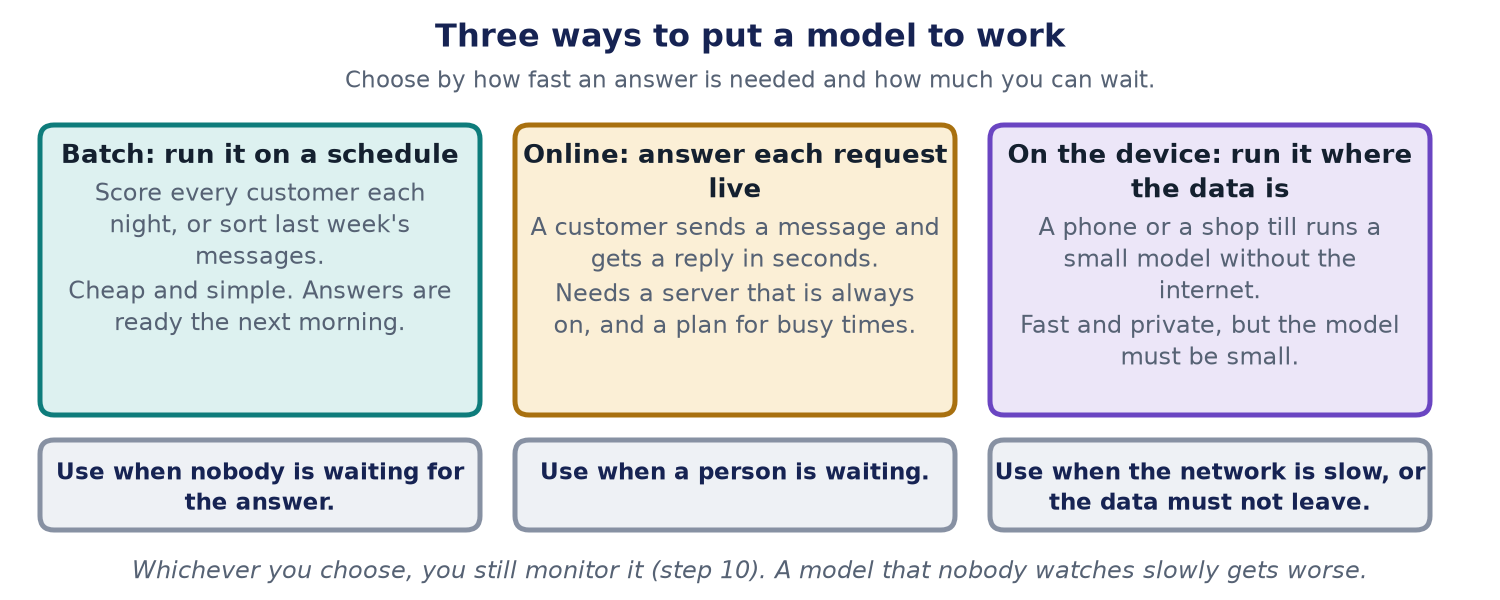
Good habits when launching:
- Test with realistic requests before real customers see it.
- Start small. Run the model quietly beside the old process and compare ("shadow mode"), or send it a small share of traffic first.
- Keep a way back. Keep the old version ready so you can switch back within minutes.
- Version everything: the model, the data it learned from and the code around it.
The trap. A big-bang launch with no way back.
Check. If it misbehaves at 3 a.m., who notices, and how do they undo it?
Step 10: Monitor and maintain
What you do. Watch the model while it works. Models do not wear out, but the world changes around them. Customers invent new words, you launch new products, and a model trained last spring slowly gets worse. This slow slide is called drift.
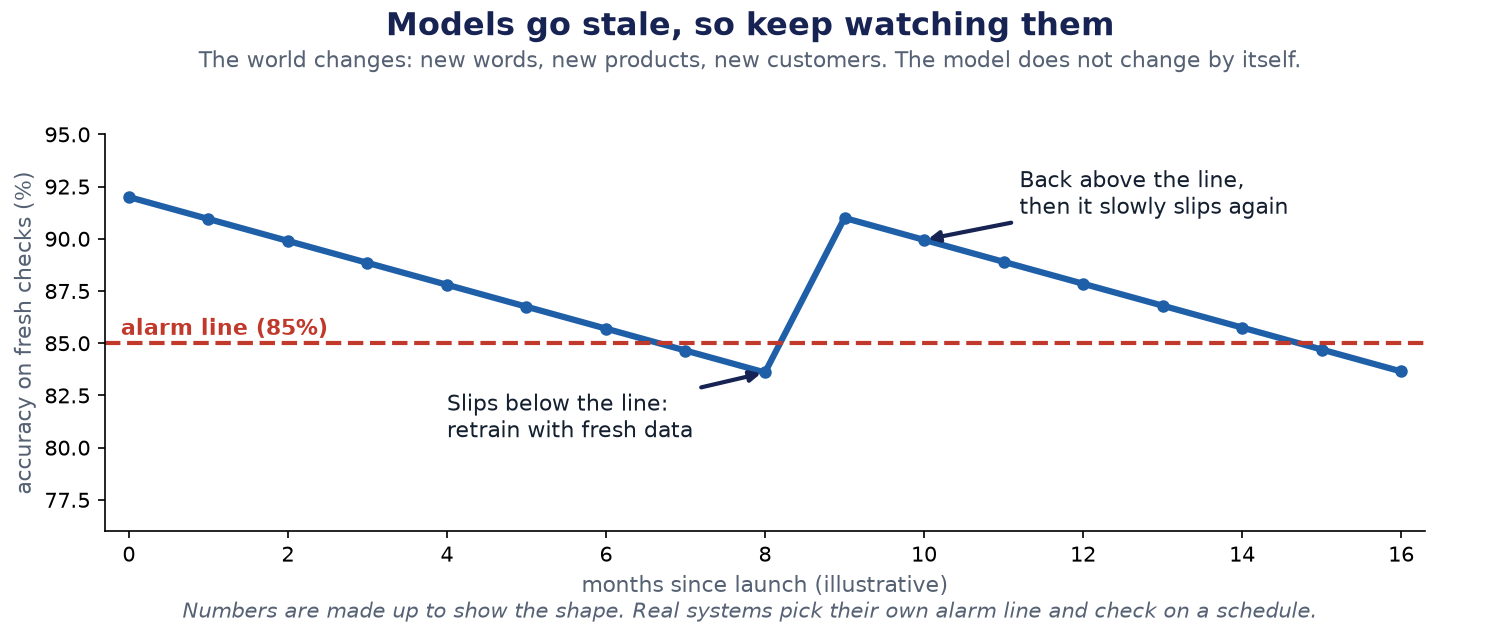
There are two kinds of drift:
- Data drift: the inputs change. Messages start to mention a product you did not sell last year.
- Concept drift: the right answer changes. Last year a long delay was a "question". After a bad week, customers use the same words to mean "complaint".
What to watch: the inputs (do they look like the training data?), the outputs (is the share of "complaint" suddenly different?), and, when you can get them, real outcomes (how often a person overruled the model).
What to do about it. Set an alarm line. Collect fresh examples all the time. Retrain on a schedule, or when the alarm sounds. Test the new model against the old one before switching. Keep the old one ready.
The trap. Launching and forgetting.
Check. Do you know today how well the model is doing, without asking anyone to run a special test?
The loop
After step 10, you go back to step 1 with new questions: Is the problem the same? Do we have new data? Has the business changed? Real teams go round this loop for as long as the model is in use. The tools and habits for running the loop smoothly and safely have a name: MLOps.
Language models change the workflow, not the need for it
Most teams today do not train a language model from scratch. They start from a model someone else trained (Chapter 8). So steps 6 and 7 become "choose a model, then steer it with a prompt, give it documents (RAG, Chapter 10), or tune it a little".
But steps 1, 8, 9 and 10 matter more than ever. You still need a clear job, a fixed set of test questions, a careful launch and constant watching. The main book, *From One Call to a Platform*, is largely about doing steps 8 to 10 well for language models.
Back to Asha
Asha's sorter does well on the final exam: it catches 96 of 100 complaints. She launches it quietly beside her own reading of the inbox. Two months later, a new product, a gift box, arrives. Customers write "my box came crushed", and the model files it as a question. Her monthly check, which compares the model's answers with what she actually did, shows the catch rate has fallen to 88. That is below her alarm line of 90. She adds 200 fresh examples, retrains, and the rate returns to 95. Without step 10, she would have found out from angry customers.
Words explained
- EDA (exploratory data analysis): looking at the data, with counts and charts, before building anything.
- Feature: one clue the model sees.
- Feature engineering: choosing and shaping those clues.
- Target leakage: a clue that secretly contains the answer but will not exist when the model is used.
- Baseline: the simplest thing that could work, used as a yardstick.
- Hyperparameter: a setting you choose before learning, such as the size of a network.
- Cross-validation: testing by rotating which part of the data is held out.
- Drift: the world changing until a once-good model gets worse.
- MLOps: the practices for running the machine learning workflow reliably.
The limits of this chapter
- The ten steps are a common pattern. Real projects merge, skip or repeat steps, and different teams name them differently.
- The numbers about Asha's messages are invented to show the ideas.
- The workflow for very large language models adds more steps, such as massive data collection and safety training, that only a few organisations carry out.
For engineers
- Pipelines. Express the steps as a pipeline (a directed graph of tasks) in an orchestrator so every run is repeatable. Keep raw data immutable and version datasets, features, code and models together.
- Training-serving skew. The same feature must be computed the same way in training and in production. A shared feature definition or a feature store prevents silent mismatches.
- Splits. Use time-based splits when the future must be predicted from the past, so no future information leaks backwards. Use stratified splits for rare classes. Fit all preprocessing on the training portion only.
- Metrics for rare classes. Report precision, recall and F1 per class, the precision-recall curve, and a confusion matrix, not only accuracy. Choose the decision threshold from the cost of each kind of mistake.
- Deployment. Common patterns are batch scoring, a real-time service, and on-device inference. Release with shadow mode, canary rollout and a one-step rollback. A model registry records which version is live.
- Monitoring. Track input drift (for example population stability index or a statistical distance between distributions), output distribution, latency, errors and, where labels arrive later, real quality. Alert on thresholds and trigger retraining or review.
- Governance. Keep a record of data sources, consent, the evaluation results and known limits for each model version.
Check yourself
- Why split the data before cleaning it? Answer: Cleaning that uses the exam pile lets information from it leak into your choices, so the final score stops being honest.
- What is target leakage? Answer: A clue that contains the answer but will not exist when the model is used in real life, such as a refund that is only sent after the message is classified.
- Why does a model get worse after launch even though nobody changed it? Answer: The world changes: new words, products and customers. This is drift, which is why you monitor and retrain.